1) Client-server model
The Client-server model is a distributed application structure that partitions task or workload between the providers of a resource or service, called servers, and service requesters called clients. In the client-server architecture, when the client computer sends a request for data to the server through the internet, the server accepts the requested process and deliver the data packets requested back to the client. Clients do not share any of their resources. Examples of Client-Server Model are Email, World Wide Web, etc.
- Client: When we talk the word Client, it mean to talk of a person or an organization using a particular service. Similarly in the digital world a Client is a computer (Host) i.e. capable of receiving information or using a particular service from the service providers (Servers).
- Servers: Similarly, when we talk the word Servers, It mean a person or medium that serves something. Similarly in this digital world a Server is a remote computer which provides information (data) or access to particular services.
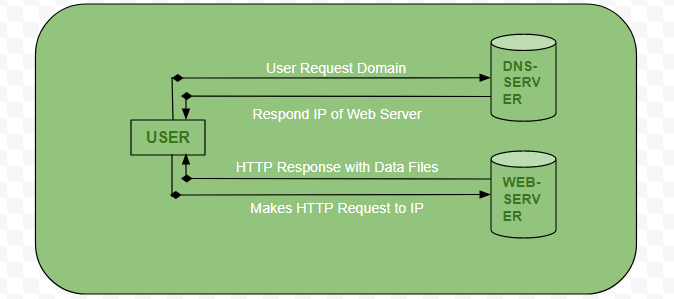
- User enters the URL(Uniform Resource Locator) of the website or file. The Browser then requests the DNS(DOMAIN NAME SYSTEM) Server.
- DNS Server lookup for the address of the WEB Server.
- DNS Server responds with the IP address of the WEB Server.
- Browser sends over an HTTP/HTTPS request to WEB Server’s IP (provided by DNS server).
- Server sends over the necessary files of the website.
- Browser then renders the files and the website is displayed. This rendering is done with the help of DOM (Document Object Model) interpreter, CSS interpreter and JS Engine collectively known as the JIT or (Just in Time) Compilers.
Advantages of Client-Server model:
- Centralized system with all data in a single place.
- Cost efficient requires less maintenance cost and Data recovery is possible.
- The capacity of the Client and Servers can be changed separately.
Disadvantages of Client-Server model:
- Clients are prone to viruses, Trojans and worms if present in the Server or uploaded into the Server.
- Server are prone to Denial of Service (DOS) attacks.
- Data packets may be spoofed or modified during transmission.
- Phishing or capturing login credentials or other useful information of the user are common and MITM(Man in the Middle) attacks are common.
........................................................................................................................................................................................................................
2) Browser - graphical and Hypertext Access to the Internet:
Browser
Alternatively referred to as a web browser or Internet browser, a browser is a software program to present and explore content on the World Wide Web. These pieces of content, including pictures, videos, and web pages, are connected using hyperlinks and classified with URIs (Uniform Resource Identifiers). This page is an example of a web page that can be viewed using a browser.
The Client-server model is a distributed application structure that partitions task or workload between the providers of a resource or service, called servers, and service requesters called clients. In the client-server architecture, when the client computer sends a request for data to the server through the internet, the server accepts the requested process and deliver the data packets requested back to the client. Clients do not share any of their resources. Examples of Client-Server Model are Email, World Wide Web, etc.
- Client: When we talk the word Client, it mean to talk of a person or an organization using a particular service. Similarly in the digital world a Client is a computer (Host) i.e. capable of receiving information or using a particular service from the service providers (Servers).
- Servers: Similarly, when we talk the word Servers, It mean a person or medium that serves something. Similarly in this digital world a Server is a remote computer which provides information (data) or access to particular services.
- User enters the URL(Uniform Resource Locator) of the website or file. The Browser then requests the DNS(DOMAIN NAME SYSTEM) Server.
- DNS Server lookup for the address of the WEB Server.
- DNS Server responds with the IP address of the WEB Server.
- Browser sends over an HTTP/HTTPS request to WEB Server’s IP (provided by DNS server).
- Server sends over the necessary files of the website.
- Browser then renders the files and the website is displayed. This rendering is done with the help of DOM (Document Object Model) interpreter, CSS interpreter and JS Engine collectively known as the JIT or (Just in Time) Compilers.
Advantages of Client-Server model:
Disadvantages of Client-Server model:
........................................................................................................................................................................................................................
2) Browser - graphical and Hypertext Access to the Internet:
Browser
Alternatively referred to as a web browser or Internet browser, a browser is a software program to present and explore content on the World Wide Web. These pieces of content, including pictures, videos, and web pages, are connected using hyperlinks and classified with URIs (Uniform Resource Identifiers). This page is an example of a web page that can be viewed using a browser.
List of current Internet browsers
- Google Chrome
- Microsoft Edge
- Microsoft Internet Explorer
- Mozilla Firefox
- Opera
- Apple Safari
- Amazon Silk
Hypertext
Hypertext is text displayed on a computer display or other electronic devices with references (hyperlinks) to other text that the reader can immediately access.[1] Hypertext documents are interconnected by hyperlinks, which are typically activated by a mouse click, keypress set or by touching the screen. Apart from text, the term "hypertext" is also sometimes used to describe tables, images, and other presentational content formats with integrated hyperlinks. Hypertext is one of the key underlying concepts of the World Wide Web,[2] where Web pages are often written in the Hypertext Markup Language (HTML). As implemented on the Web, hypertext enables the easy-to-use publication of information over the Internet.
........................................................................................................................................................................................................................
- Google Chrome
- Microsoft Edge
- Microsoft Internet Explorer
- Mozilla Firefox
- Opera
- Apple Safari
- Amazon Silk
Hypertext is text displayed on a computer display or other electronic devices with references (hyperlinks) to other text that the reader can immediately access.[1] Hypertext documents are interconnected by hyperlinks, which are typically activated by a mouse click, keypress set or by touching the screen. Apart from text, the term "hypertext" is also sometimes used to describe tables, images, and other presentational content formats with integrated hyperlinks. Hypertext is one of the key underlying concepts of the World Wide Web,[2] where Web pages are often written in the Hypertext Markup Language (HTML). As implemented on the Web, hypertext enables the easy-to-use publication of information over the Internet.
........................................................................................................................................................................................................................
3) HTTP
- HTTP stands for HyperText Transfer Protocol.
- It is a protocol used to access the data on the World Wide Web (www).
- The HTTP protocol can be used to transfer the data in the form of plain text, hypertext, audio, video, and so on.
- This protocol is known as HyperText Transfer Protocol because of its efficiency that allows us to use in a hypertext environment where there are rapid jumps from one document to another document.
- HTTP is similar to the FTP as it also transfers the files from one host to another host. But, HTTP is simpler than FTP as HTTP uses only one connection, i.e., no control connection to transfer the files.
- HTTP is used to carry the data in the form of MIME-like format.
- HTTP is similar to SMTP as the data is transferred between client and server. The HTTP differs from the SMTP in the way the messages are sent from the client to the server and from server to the client. SMTP messages are stored and forwarded while HTTP messages are delivered immediately.
HTTP Transactions
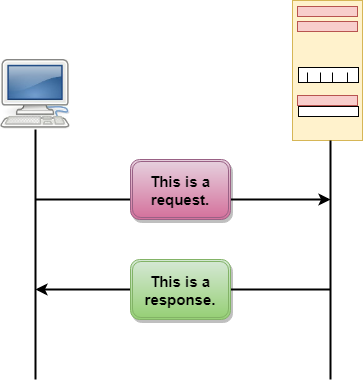
HTTP messages are of two types: request and response. Both the message types follow the same message format.
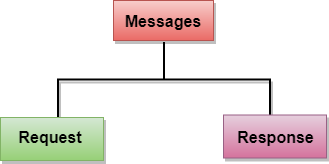
Request Message: The request message is sent by the client that consists of a request line, headers, and sometimes a body.
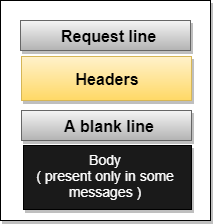
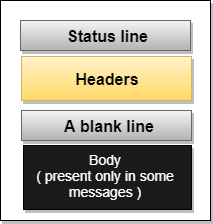
Response Message: The response message is sent by the server to the client that consists of a status line, headers, and sometimes a body.